Key takeaways
- The best webcams for streaming, calls and content creation compared on published resolution, frame rate, field of view, microphones and connection.
- Top Pick: Logitech MX Brio
- Runner-up: Razer Kiyo Pro
- Also consider: Anker PowerConf C200
If you want one webcam that covers nearly everything, the Logitech MX Brio is the strongest all-round pick here: it records 4K at 30 frames per second or 1080p at 60 frames per second, offers three field of view settings, and pairs dual beamforming microphones with a USB-C connection. If smooth motion matters more than raw resolution, the Razer Kiyo Pro delivers uncompressed 1080p at 60 frames per second with an adjustable wide-angle lens. The Anker PowerConf C200 sits in the middle with 2K video and AI noise cancelling microphones, while the Logitech C920s HD Pro and the NexiGo N60 cover everyday calls at the budget tier with 1080p video and built-in microphones.
As an Amazon Associate, we earn from qualifying purchases.
Table of Contents
- How to Choose a Webcam
- Logitech MX Brio
- Razer Kiyo Pro
- Anker PowerConf C200
- Logitech C920s HD Pro
- NexiGo N60
- Quick Comparison
- Frequently Asked Questions
- Conclusion
- Product and ASIN Reference
How to Choose a Webcam
Resolution and frame rate
Resolution decides how much detail the sensor can capture, and frame rate decides how smooth movement looks. A 1080p camera is enough for most video calls, because meeting apps compress your feed anyway. A 2K or 4K camera gives you extra detail for recorded videos, tutorials and cropped close-ups, since you can zoom in during editing and still keep a sharp picture. Frame rate matters when you move a lot on camera: 60 frames per second looks noticeably smoother for streaming and fast hand demonstrations, while 30 frames per second is the norm for calls.
Field of view
Field of view is measured in degrees and controls how much of the room appears in frame. A narrow view around 65 to 78 degrees keeps the focus on your face and shoulders. A wide view of 90 degrees or more fits a second person, a whiteboard or more of your setup. Several cameras in this guide let you switch between preset angles in software, which is handy if you present to a group one day and record solo videos the next.
Microphones
Every webcam here has a built-in microphone, but the designs differ. Stereo microphone pairs pick up a more natural sense of space, beamforming arrays aim at your voice and reduce room noise, and omni-directional microphones capture sound from all directions, which suits group calls around one desk. If you record narration or stream to an audience, a dedicated microphone will still sound fuller, but a good built-in array is fine for meetings and quick recordings.
Connection and extras
All five cameras connect over USB and work without extra power supplies. USB-C models suit current laptops, while USB-A models plug straight into older machines and docks. A USB 3.0 link is worth having on cameras that send uncompressed high frame rate video. Useful extras include autofocus, automatic light correction for dim rooms, a physical privacy cover or shutter, and a mount that folds over a monitor or attaches to a tripod.
Logitech MX Brio

The MX Brio is Logitech’s flagship webcam and the only 4K model in this guide. It records Ultra HD 4K at 30 frames per second, and drops to 1080p at 60 frames per second when you want smoother motion for streaming or screen-shared demonstrations. Logitech publishes three diagonal field of view presets, 90, 78 and 65 degrees, so you can frame a wide desk scene or a tighter head and shoulders shot from the same camera.
Two beamforming microphones with noise reduction handle voice pickup, and the maker rates the pickup range at up to 1.5 metres in its published specification. A built-in privacy shutter closes over the lens when the camera is idle, and the Show Mode feature tilts the view down toward your desk for sharing sketches, documents or products during a call. The detachable USB-C to USB-C cable supports the USB 3.0 standard, which the higher resolution modes need. This is the premium tier pick for creators who record as much as they call, and for professionals who want one camera for meetings, tutorials and uploads.
Specs
- Resolution and frame rate: 4K Ultra HD (3840 x 2160) at 30 fps; 1080p (1920 x 1080) at 60 fps
- Field of view: 90, 78 or 65 degrees diagonal, selectable
- Microphone: Dual beamforming microphones with noise reduction
- Connection: USB-C, detachable USB-C to USB-C cable, USB 3.0
- Extras: Autofocus, built-in privacy shutter, Show Mode, monitor mount with tripod thread
Razer Kiyo Pro
The Kiyo Pro is built for streamers who value smooth, uncompressed video over headline resolution. It captures 1080p at 60 frames per second without compression, and an HDR mode runs at 1080p and 30 frames per second for scenes with bright windows or uneven lighting. Razer publishes an adaptive light sensor that adjusts exposure as room light changes, which helps facecam feeds stay even during long sessions.
Its wide-angle lens offers three diagonal field of view options, 103, 90 and 80 degrees, changed in the Razer Synapse software. The built-in microphone array records in stereo with an omni-directional pickup pattern and a 16-bit 48 kHz audio codec, so it hears voices around the desk as well as the person in front of the screen. A USB 3.0 connection carries the uncompressed signal, and Razer notes that a USB 3.0 port is recommended to reach the full specification. A folding privacy cover and a tripod-ready mount round out the package. For gaming streams, reaction videos and recorded content where motion clarity counts, this mid-range camera is a strong fit.
Specs
- Resolution and frame rate: 1080p at 60 fps uncompressed; 1080p at 30 fps with HDR; 720p at 60 fps
- Field of view: 103, 90 or 80 degrees diagonal, adjustable
- Microphone: Built-in stereo microphone array, omni-directional, 16-bit 48 kHz
- Connection: USB 3.0
- Extras: Adaptive light sensor, autofocus, privacy cover, Gorilla Glass 3 lens
Anker PowerConf C200
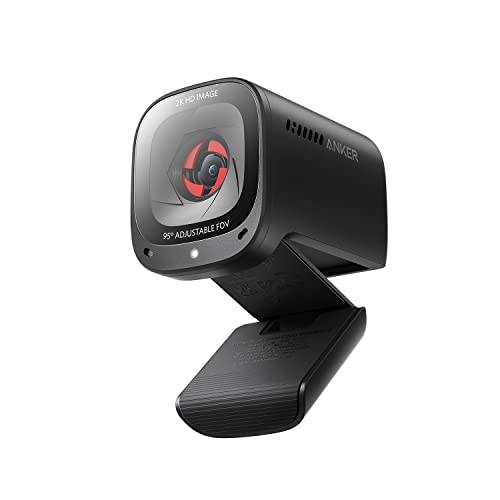
The PowerConf C200 is a compact 2K camera aimed at home office calls. Its published maximum is 2K resolution at 30 frames per second, a step above the 1080p cameras in detail, and Anker includes low-light correction that brightens dim rooms automatically. The field of view can be set to 65, 78 or 95 degrees in the companion software, so the same camera handles a tight solo frame or a wider two-person shot.
Dual stereo microphones use AI noise cancellation to focus on voices and reduce background sound, a practical touch for shared homes and open rooms. A privacy cover is built into the body and slides over the lens, so there is no separate cap to keep track of. The camera connects over USB-C and works with Windows and macOS, and the small body mounts on top of a monitor or laptop screen without adding much bulk. If your day is mostly meetings and you want sharper video than 1080p without moving to a 4K flagship, this mid-range option covers that ground well.
Specs
- Resolution and frame rate: 2K (2560 x 1440) at 30 fps
- Field of view: 65, 78 or 95 degrees, adjustable in software
- Microphone: Dual stereo microphones with AI noise cancellation
- Connection: USB-C
- Extras: Built-in privacy cover, low-light correction, autofocus, monitor mount
Logitech C920s HD Pro

The C920s HD Pro is the long-running workhorse of the Logitech line. It records Full HD 1080p at 30 frames per second and 720p at 30 frames per second, which matches what most meeting platforms accept and keeps files and streams light. Its published diagonal field of view is 78 degrees, a natural framing for one person at a desk with a little background in view.
Two built-in microphones record in stereo, and the camera includes autofocus plus automatic light correction that adjusts exposure in dimmer rooms. A privacy shutter attaches over the lens for peace of mind between calls, a feature the earlier C920 design lacked. The connection is USB-A with plug and play setup on Windows, macOS and Chrome OS, so it works with older laptops and docks without adapters. There is no companion software requirement for basic use, though Logitech offers an app for settings such as zoom and pan. For anyone upgrading from a built-in laptop camera for work calls and classes, this budget tier model remains an easy recommendation.
Specs
- Resolution and frame rate: 1080p (1920 x 1080) at 30 fps; 720p at 30 fps
- Field of view: 78 degrees diagonal
- Microphone: Built-in stereo microphones
- Connection: USB-A, plug and play
- Extras: Autofocus, automatic light correction, attachable privacy shutter, 1.5 m cable
NexiGo N60

The N60 is the simplest camera in this guide and the natural budget tier choice for basic calls. It records 1080p at 30 frames per second through a fixed focus glass lens, and its published field of view is a wide 110 degrees, which suits small group calls around one screen or showing more of a room during lessons and family chats.
A built-in noise cancelling microphone handles voice pickup, and the camera connects over USB with plug and play support for Windows, macOS, Linux and Chrome OS. A separate privacy cover is included in the box and clips over the lens when the camera is not in use. Because the focus is fixed, the N60 works best when you sit at a steady desk distance rather than moving around the frame. NexiGo offers optional software for adjusting settings such as brightness and field of view on a computer. If you need a spare camera for a second machine, a simple upgrade over an old laptop camera, or a wide view for group calls without extra features to manage, the N60 covers those needs in a compact body.
Specs
- Resolution and frame rate: 1080p (1920 x 1080) at 30 fps
- Field of view: 110 degrees
- Microphone: Built-in noise cancelling microphone
- Connection: USB 2.0, plug and play
- Extras: Privacy cover included, fixed focus 3.6 mm glass lens, monitor mount
Quick Comparison
| Webcam | Max resolution and frame rate | Field of view | Microphone | Connection | Tier |
|---|---|---|---|---|---|
| Logitech MX Brio | 4K at 30 fps, 1080p at 60 fps | 90, 78 or 65 degrees | Dual beamforming | USB-C (USB 3.0) | Premium |
| Razer Kiyo Pro | 1080p at 60 fps | 103, 90 or 80 degrees | Stereo, omni-directional | USB 3.0 | Mid-range |
| Anker PowerConf C200 | 2K at 30 fps | 65, 78 or 95 degrees | Dual stereo, AI noise cancelling | USB-C | Mid-range |
| Logitech C920s HD Pro | 1080p at 30 fps | 78 degrees | Stereo | USB-A | Budget |
| NexiGo N60 | 1080p at 30 fps | 110 degrees | Noise cancelling | USB 2.0 | Budget |
Frequently Asked Questions
Is 1080p or 4K better for video calls?
For live calls, 1080p is usually enough, because meeting apps compress your video and few platforms send a 4K feed. A 4K camera such as the MX Brio earns its place when you record videos, crop into the frame while editing, or want extra detail for tutorials and product demonstrations.
What frame rate do you need for streaming?
Thirty frames per second looks fine for seated talking and most calls. Sixty frames per second, offered by the MX Brio at 1080p and by the Kiyo Pro as its top mode, keeps movement smoother for gaming facecams, fast gestures and demonstrations, and it is the safer choice if your content involves a lot of motion.
Does a wider field of view make a webcam better?
Not always. A wide view like the 110 degrees of the NexiGo N60 fits groups and shows more of your space, but it can make your face smaller in frame and add edge distortion. A narrower view keeps attention on you. Adjustable models let you pick per session, which is the most flexible option.
Do you need a separate microphone with a webcam?
For meetings and classes, the built-in microphones in this guide are designed to carry your voice clearly, especially the beamforming and AI noise cancelling designs. If you record podcasts, narration or music, a dedicated microphone placed closer to your mouth will give a fuller sound than any camera-mounted array.
Conclusion
Match the camera to the work you do most. The Logitech MX Brio is the premium all-rounder with 4K recording, three framing presets and strong voice pickup. The Razer Kiyo Pro favors streamers with uncompressed 1080p at 60 frames per second and an adjustable wide lens. The Anker PowerConf C200 gives home office callers 2K detail and noise cancelling microphones in a small body. The Logitech C920s HD Pro remains a dependable budget choice for everyday calls, and the NexiGo N60 covers group calls and spare setups with the widest view here. Whichever tier you choose, check the connection type against your computer’s ports before ordering, and you will have a camera that plugs in and works from the first call.