
Key takeaways
- For most PC builders the Arctic P12 Pro is the best-value case fan to buy in multiples, the Noctua NF-A12x25 G2 PWM is the pick when noise and efficiency…
For most PC builders the Arctic P12 Pro is the best-value case fan to buy in multiples, the Noctua NF-A12x25 G2 PWM is the pick when noise and efficiency matter most, the Thermalright TL-C12C suits the tightest budgets, and the Corsair RS120 suits people who want RGB lighting and tidy daisy-chained cables. Under the 100-dollar cap you can fill an entire case with fans in the value tiers, or buy a few premium fans for the positions that matter most, such as the front intake and rear exhaust. The right choice depends on whether you prioritize silence, airflow, lighting or cost per fan.
Our top picks


As an Amazon Associate we earn from qualifying purchases at no extra cost to you.
What a case fan actually does
A case fan moves air through the chassis to carry heat away from the CPU, graphics card, memory and drives. Fans are rated by airflow (measured in CFM or cubic meters per hour), static pressure (how well they push air through resistance such as dust filters, mesh panels and radiators), noise (dB(A)) and speed (RPM). Reviewers who measure fans often point out that the maker’s spec sheet and an independent measurement can differ, and that a fan with higher peak airflow is not always quieter or better at the speeds people actually run. In practice the fan curve in your BIOS or fan software matters as much as the model.
At a glance: popular case fans
| Fan | Best for | Key stated specs | Limits |
|---|---|---|---|
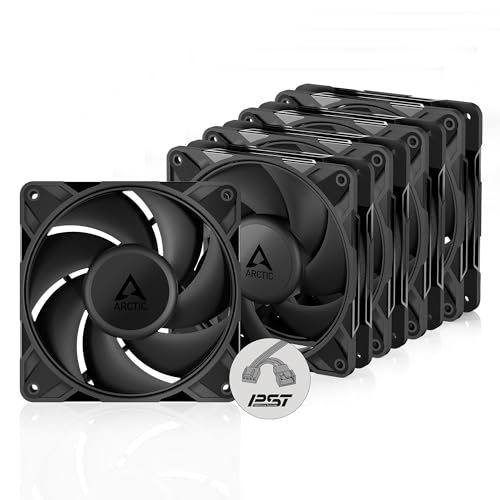
| Arctic P12 Pro | Value, airflow, radiators | 120 mm PWM fan; reviewers report up to about 3000 RPM; PC Gamer’s retest found it posted high airflow at maximum speed | Louder at top speed; less efficient than the Noctua at lower speeds |
| Noctua NF-A12x25 G2 PWM | Quiet, efficient, premium builds | 120 mm PWM fan; named best PC fan by PC Gamer; the maker lists 22.5 dB(A) at maximum speed and a 6-year warranty | Costs several times more per fan than the value options |
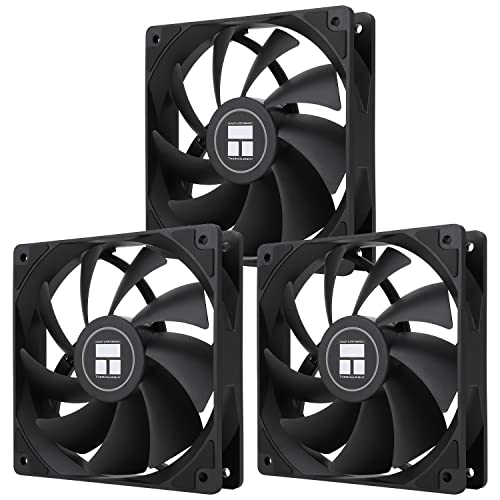
| Thermalright TL-C12C | Lowest cost per fan | The maker lists 1550 RPM (plus or minus 10 percent), 25.6 dBA and 66.17 CFM maximum | Lower pressure and speed; plain styling |
| Corsair RS120 | RGB lighting, clean cabling | 120 mm PWM; daisy-chain connectors; the maker lists speeds up to 2100 RPM and up to 4.15 mmH2O static pressure | Can be louder than the premium fans at top speed |
| be quiet! Silent Wings 4 | Very low noise | Premium acoustic design aimed at quiet systems, per the maker | Higher cost per fan |
Understanding the specs
Airflow vs static pressure
Airflow fans move a large volume of air in open spaces, so they work well as case exhaust or as intake behind a mesh front panel. Static pressure fans push through resistance, which makes them the better choice for radiators, tight dust filters and heatsinks. Many modern 120 mm fans are hybrids, but their datasheets usually tell you which side they favor. The TL-C12C is a general case ventilation fan, while the P12 Pro and NF-A12x25 are commonly used on radiators and heatsinks.
PWM vs DC
A four-pin PWM fan lets the motherboard adjust speed smoothly from a fixed power supply, so it can idle almost silently. A three-pin DC fan changes speed by varying voltage, which is less precise and may not spin below a certain level. For most modern builds, choose PWM fans and connect them to motherboard headers or a fan hub.
Bearing type
Makers use fluid dynamic, sleeve, magnetic and other bearing designs with different life expectancies and noise signatures. Reviewers often favor fluid-based designs for quiet operation, and the TL-C12C is reported to use an S-FDB bearing. Warranties are a useful hint: a six-year warranty, as the maker lists for the NF-A12x25 G2, signals confidence in longevity.
Size: 120 mm vs 140 mm
A 140 mm fan moves more air at a lower RPM than a 120 mm fan, so it can be quieter at the same airflow. However, many cases and radiators support only 120 mm fans in some positions. Check your case’s specification sheet for supported sizes in each location.
Thickness and frame
Most case fans are 25 mm thick. Slim 15 mm fans exist for tight spaces, but they usually move less air. Rubber pads and anti-vibration mounts can reduce resonance noise in thin case panels.
Budget tiers
Budget tier: bulk packs of simple fans
The Thermalright TL-C12C is often sold in multi-packs, and roundup sites highlight its low cost per fan. At 66 CFM maximum, the maker’s figure is enough for general case ventilation in a gaming PC. Pair these with a sensible fan curve so they stay quiet at idle. They suit builders filling every spare mount on a small budget.
Mid-range tier: the Arctic P12 Pro and Corsair RS120
The Arctic P12 Pro is the value star because it competes with fans several times its cost in raw airflow, according to PC Gamer’s retest, and you can buy a pack for the price of one premium fan. The Corsair RS120 costs more but adds lighting and a daisy-chain connection that reduces cable clutter. Roundups suggest using P12 Pro fans on a radiator and RS120 fans on intake and exhaust positions if you want both performance and a clean look.
Premium tier: Noctua and be quiet!
The NF-A12x25 G2 appears first on many lists and on PC Gamer’s, offering strong airflow and low noise. It is a good choice for a few key positions, like the front intake or the CPU cooler. Reviewers also point to its long warranty. If budget is tight, buy one or two of these and fill the other positions with value fans.
Placement and airflow
- Front intake, rear exhaust. Most cases work best with fans pulling cool air in through the front and pushing warm air out of the back, with additional exhaust at the top.
- Positive vs negative pressure. More intake than exhaust pushes air out through gaps and tends to reduce dust, because filters catch more of what enters. More exhaust than intake can pull dust in through unfiltered gaps.
- Arrow markings. Most fans show an arrow for airflow direction and another for rotation on the frame. Install them so the air direction matches your plan.
- Radiators. If you use a liquid cooler, choose fans with good static pressure for the radiator positions.
- Dust filters. Clean filters every few months so airflow stays high.
Installation and safety
Shut down the computer, turn off the power supply and unplug the power cord before opening the case. Keep cables clear of the blades and tie them with cable ties, because a cable touching a spinning blade can cause noise or damage. Connect PWM fans to motherboard headers, or a fan hub if you have more fans than headers, and do not exceed the per-header current limit listed in the motherboard manual. If you use a hub, connect it to a header that supports adequate power and a SATA or Molex power source as the hub’s manual directs. RGB fans use a separate lighting header, so match the connector type (such as addressable 5V three-pin) listed by the maker.
Pick X if you need Y
| If you need | Pick | Reason |
|---|---|---|
| The best value for a full set of fans | Arctic P12 Pro | High airflow and low cost per fan, according to reviewers |
| The quietest, most refined option | Noctua NF-A12x25 G2 PWM | Top pick at PC Gamer; low reported noise |
| The lowest cost per fan | Thermalright TL-C12C | The maker lists 66.17 CFM and 25.6 dBA |
| RGB lighting with tidy cables | Corsair RS120 | Daisy-chain connectors, up to 2100 RPM per the maker |
| A silent office or media PC | be quiet! Silent Wings 4 or Noctua | Designed for low noise |
Alternatives
- Lian Li UNI FAN series. Popular for snap-together daisy-chained RGB fans and clean builds.
- Arctic P14 and other 140 mm fans. Larger fans provide strong airflow at lower RPM where your case supports them.
- Corsair iCUE LINK fans. A single-cable ecosystem for people already using Corsair hardware.
Frequently Asked Questions
How many case fans do I need?
Most gaming PCs perform well with two or three intake fans in the front and one exhaust fan at the rear, plus optional top exhaust. Very small cases may need fewer. More fans do not always cool better if they create turbulence, so match the number to your case design and heat load.
Is a more expensive fan always quieter?
Not always, but premium fans are usually engineered for lower noise at a given airflow. Value fans such as the Arctic P12 Pro can be quiet at moderate speeds and loud at maximum speed. A custom fan curve can make a cheap fan much less noticeable.
Should I choose PWM or DC fans?
PWM is better for most modern builds because it allows smooth speed control and a low idle speed. DC fans may work on older boards or fan controllers that only support voltage control. Check your motherboard’s header type before buying.
Which direction should the fan blow?
Use the arrows on the fan frame to see the airflow direction. Front and bottom fans usually bring air in, while rear and top fans usually push air out. If a fan is installed backward, it can reduce cooling noticeably.
Are RGB fans worth it?
Lighting does not change cooling performance. It is a style choice that may add cost and cable complexity. If your case has a glass panel and you like the look, RGB fans with daisy-chain cables are a reasonable way to keep wiring tidy.
How often should I clean case fans?
Dust builds up on filters and blades over months, especially in homes with pets. Power the PC off and unplug it, then use a soft brush or compressed air in short bursts while holding the blades still. Cleaning every few months keeps temperatures and noise lower.
